> BOOTING PONG_OS_V1...
> LOADING PYTHON_INTERPRETER...
> INITIALIZING PYGAME_LIB...
> READY_
Pong Game Python :: V1.0
This is a retro Pong clone I developed during my final year of high school. It represents one of my earliest dives into programming and game logic. Written completely in Python using the Pygame library, it taught me the fundamentals of the game loop, state management, and event handling.
- YEAR
- 2019
- ENGINE
- Pygame
- LANGUAGE
- Python 3
- MODE
- Solo (1 dev)
- ROLE
- Self-Taught Developer
- BUILD
- Linux .AppImage
SYS_FEATURES .TXT
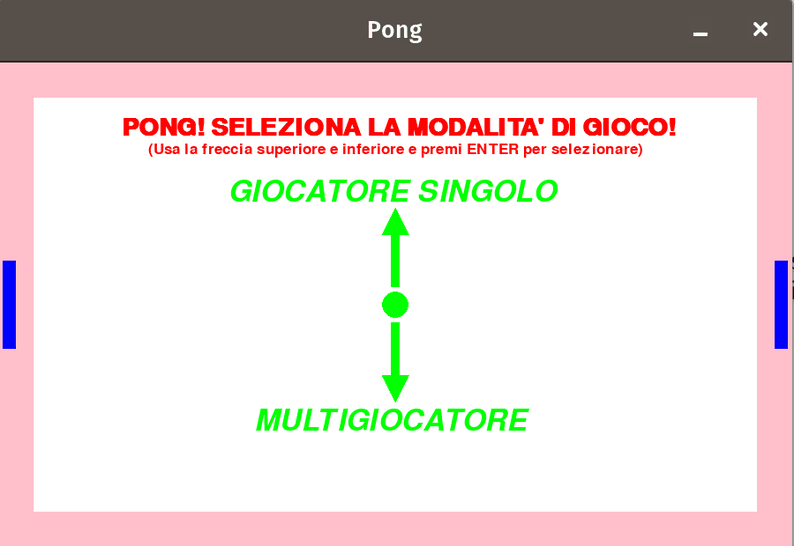
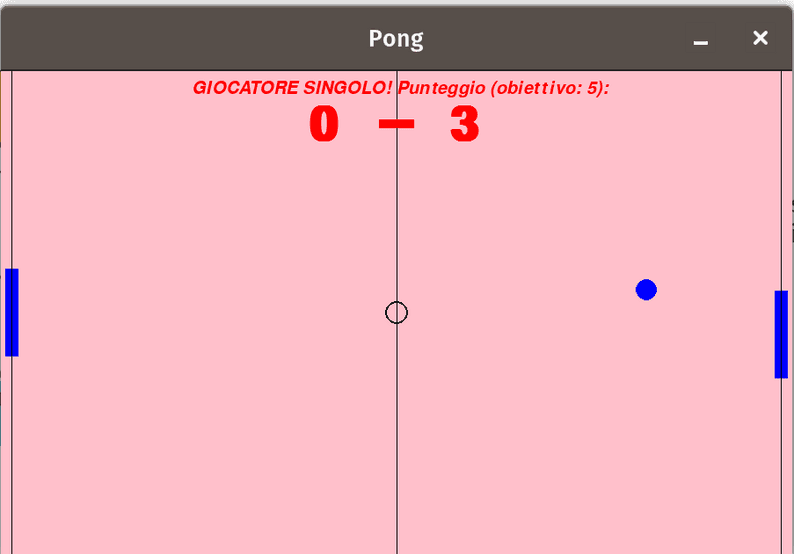
- >Controls: Slide your paddle up and down with W/S (Player 1) or the UP/DOWN arrows (Player 2). Instant response, no perceptible lag, just like a '70s arcade cabinet.
- >Game feel: Every bounce speeds the ball up and shifts its angle based on where it hits the paddle, rewarding clever positioning and last-pixel saves.
- >Solo challenge: Practice against the CPU opponent that reads the ball's trajectory: predictable enough to learn, sharp enough to keep you on your toes.
- >Couch duel: Two players, one keyboard, side by side. First to hit the target score takes it: the match ends on the spot, no dead time between rounds.
- >Retro atmosphere: Authentic bleeps and bloops on every hit and score, over crisp blocky shapes that trigger pure arcade nostalgia.
Python & Pygame
Written entirely from scratch in Python relying exclusively on the Pygame library for painting buffer pixels to the screen, capturing keyboard events, and computing real-time AABB collision mathematics.
AppImage Distribution
Compiled, bundled, and packaged natively for Linux as an `.AppImage` (42 MB). It contains the full embedded Python runtime and Pygame libraries, making it globally executable without CLI setup.